Free shipping on orders over R1300
Skip to product information
1 of 3

Automatic Money Scroll & Coin Bank for Kids – Pink Electronic Piggy Bank

Automatic Money Scroll & Coin Bank for Kids – Pink Electronic Piggy Bank

Regular price R 165.00 ZAR
Regular price Sale price R 165.00 ZAR
Sale Sold out
Shipping calculated at checkout.
🚚 Flat-rate nationwide delivery: R150 🎁 Free delivery on orders over R1300 📦 Most orders delivered in 3-5 working days 🔒 Secure payments via Payfast, Google Pay, Apple Pay & more

Low stock: 5 left

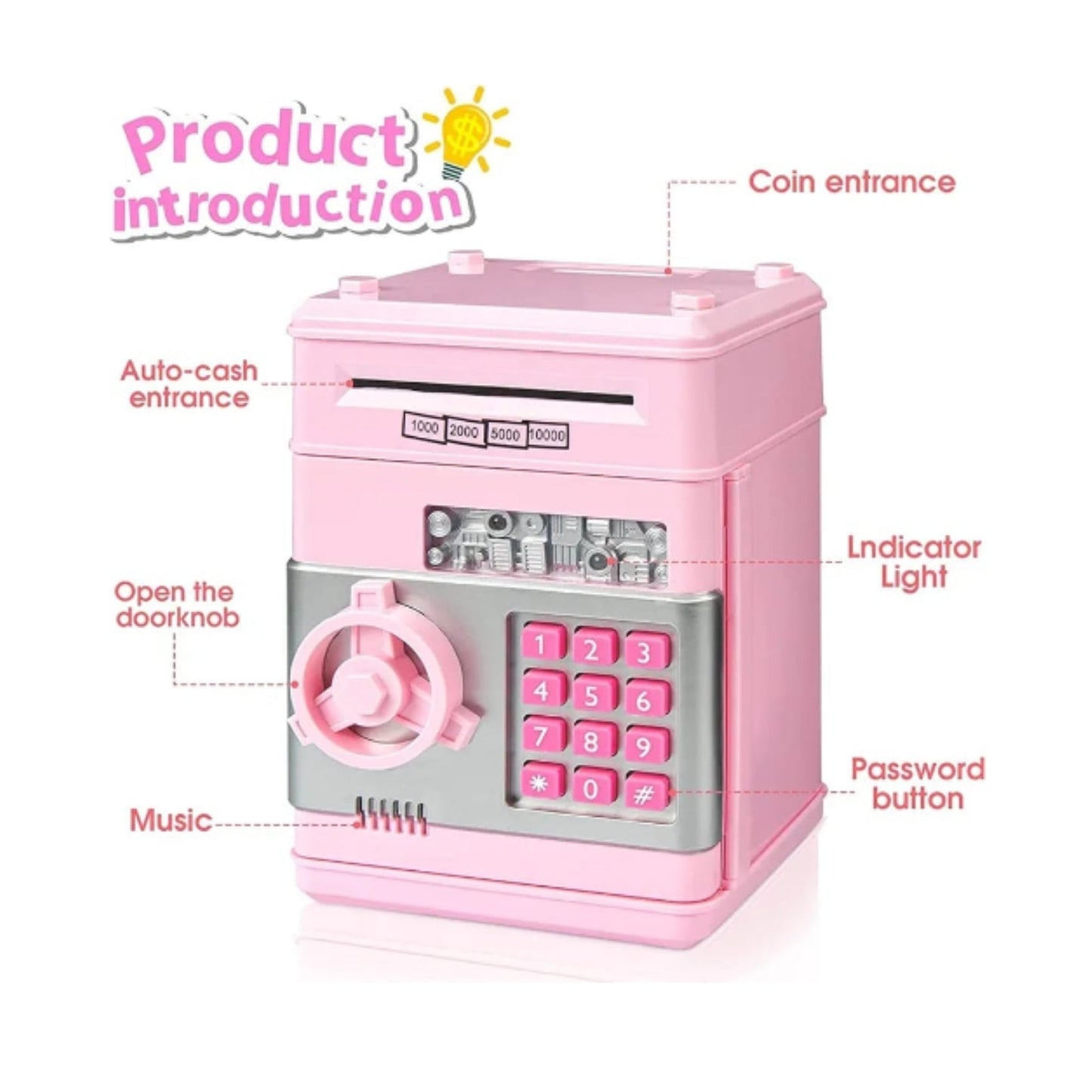
Make saving money fun and exciting with the Automatic Money Scroll & Coin Bank for Kids – Pink Electronic Piggy Bank. Designed to encourage healthy saving habits, this interactive money bank automatically pulls paper notes into the machine while securely storing both cash and coins. The vibrant pink design and realistic ATM-style note feeder make it a fun and educational gift for children learning the value of money.

Simply insert banknotes into the slot, and the automatic scrolling feature will pull them inside, while the top coin slot makes it easy to save loose change. Made from durable, child-friendly materials, this electronic piggy bank is built for everyday use and helps children develop responsible saving habits from an early age.

Whether your child is saving for a special toy, holiday, or future goal, this automatic money bank turns saving into an enjoyable activity. It's the perfect gift for birthdays, Christmas, rewards, or any special occasion.

Features

  • Automatic note scrolling function for paper money
  • Coin slot for storing loose change
  • Fun electronic piggy bank design
  • Durable, child-friendly construction
  • Encourages saving and financial responsibility
  • Stylish pink colour with a modern design
  • Suitable for everyday use at home
  • Great gift for boys and girls

Perfect For

  • Kids learning to save money
  • Birthday and Christmas gifts
  • Pocket money storage
  • Home savings
  • Building healthy financial habits

Help children develop smart money habits with the Automatic Money Scroll & Coin Bank for Kids – Pink Electronic Piggy Bank, a fun and interactive way to save cash and coins while making every deposit exciting.

Please first open the battery cover at the bottom and load the 3" AA" 1.5V, No.5 battery.


(Warm Tips: This product does not apply to high power Duracell Alkaline battery.)


Charging version: please use the equipped charging cable to fully charge the host before use.


(If the indicator light is red, it is in the charged state, and if it is off, it is in the fully charged state.)


FUNCTION INTRODUCTION


AUTOMATIC DOOR OPENING FUNCTION


When the door is closed. Enter the correct password, press the fingerprint button, and the door will open automatically (the default password is 4 zeros, which can be customized and modified).


AUTOMATIC MONEY ROLL


The induction device is triggered when you put the bank note into the money box, and the bank note is involved automatically.


(The green indicator light flashes for normal work.)


MONEY CHECK FUNCTION


This function button is located at the top of the product. The authenticity of the banknote can be distinguished by moving the banknote 30mm away from the counterfeit detector.


(Warm Tip: Please do not turn your eyes against the purple light for a long time.)


New version (no button switch): Long press the 0 key for 3 seconds to turn on the banknote checking lamp, and then long press for 3 seconds to turn off the banknote checking lamp.


This product is equipped with one charging cable, which can be connected to the USB port of a computer or a USB charging adapter to charge the piggy bank.


The charging time is about 2 hours, and the red light stays on while charging.


When fully charged, the light goes off, and the charging cable can be unplugged.


THE STEPS OF MODIFYING THE PASSWORD


Enter the current password (the original password is 0000) and open the door.


Press the * button until the lights flicker.


Continue to press the * button while using your other hand to enter the new 4-digit password.


FREQUENTLY ASKED QUESTION


Q1: I entered the correct password. The green light flashed, but the door could not open.


A1: The battery power is low. Please replace the batteries with new ones.


Q2: I forgot the password. What should I do?


A2: Press and hold the # button for 10 seconds until the green indicator light turns on. The piggy bank will restore the default password to "0000".

Box Size: 12.5x19.5cm

View full details